Chapter 14 Systematic sampling
Systematic sampling (SYS) is the most widely used probability sampling design in forest inventory. In SYS, sampling locations are arranged in a fixed pattern across the population. To introduce randomness and ensure unbiased estimation of means and totals, the pattern—typically a rectangular grid—is positioned using a randomly chosen starting point. As illustrated in Figure 1.2, sampling locations are usually aligned along straight lines. The distance between locations on a line, known as the sampling interval, and the distance between lines can differ, creating a rectangular grid. This is commonly referred to as line-plot sampling, which is our focus here.
SYS designs are popular in forestry for several reasons. Compared to SRS, their advantages include the following.
Sampling locations are evenly distributed across the population, improving spatial coverage and typically yielding more precise (lower-variance) mean and total estimates when the population shows spatial structure or broad trends. When population values show little or no spatial structure, the two designs tend to provide similar precision.
Sampling locations are easier and faster to find, reducing cost. The cruiser can follow straight lines between locations, minimizing travel time and simplifying relocation during remeasurement.
The grid is typically positioned using GIS or spatial software (e.g., R), and the resulting points are uploaded to a GPS device for navigation. Alternatively, the cruiser may locate the first sampling point in the field and lay out the remainder using the sampling interval and grid orientation.
Key considerations when implementing a SYS design include:
- the pattern and orientation of the grid;
- the method used to randomly position the grid.
These points are covered in the next few sections.
14.1 Grid pattern, number of grid points, and orientation
In practice, either a rectangular or square grid is used. A rectangular grid defines the spacing between sampling locations along a line, denoted \(D_p\) (with the subscript \(p\) reminding us this spacing is for “plots” or “points”), and the spacing between lines, \(D_l\). A square grid is a special case where \(D_{\text{sq}} = D_p = D_l\). Unless there’s a compelling reason to use unequal spacing, a square grid is a reasonable and efficient default.
Given a sample size \(n\) and total area \(A\), the spacing between locations in a square grid is given by
\[\begin{equation} D_{\text{sq}} = \sqrt{\frac{cA}{n}}, \end{equation}\]
where \(c\) is a conversion factor to express area in square distance units. For example, use \(c = 10,\!000\ \text{m}^2/\text{ha}\) if \(A\) is in hectares and \(D_{\text{sq}}\) is in meters, or \(c = 43,\!560\ \text{ft}^2/\text{ac}\) if \(A\) is in acres and \(D_{\text{sq}}\) is in feet.
As introduced in Section 11.3.6, sample size \(n\) should be based on the level of precision needed to meet the survey’s objectives. However, in practice, it’s common for experienced foresters to adopt a sampling intensity that works well for their forest type and inferential objectives. For example, the forester who conducted the Elk County cruise described in Section 1.2.2 typically uses a seven-by-seven chain SYS grid.
If you do use a sample size calculation, as recommended in Section 11.3.6, it’s likely that the number of grid points won’t exactly match the computed \(n\) due to how the grid falls within the boundary. In such cases, we agree with the following sage words.
My advice is simply to take the number of points that are indicated [by the grid], and live with the slight variability. Sample sizes that are “needed” … are just estimated anyway.
— Kim Iles
If you really must have a specific sample size, then a good approach is to specify a denser grid than needed and randomly or systematically thin points until the target sample size is reached (Iles 2003).
The grid orientation can be adjusted to improve field logistics. For example, aligning lines with a forest boundary may simplify navigation. This was the approach used in the Elk County cruise (Figure 1.2).
If a known gradient exists in the population—for example, productivity change with elevation—aligning the grid to cross the gradient usually helps ensure the sample spans the range of values, which often improves precision. This benefit arises because the grid forces broad spatial patterns to be represented in the sample, patterns that might be missed when locations are placed at random.
Although rare, it’s possible for a population to exhibit a systematic pattern that aligns with the grid spacing and orientation. For example, a grid aligned with plantation rows might consistently place sampling locations between rows, giving an incomplete view of the population. Rotating the grid to avoid alignment with such periodic features can prevent this problem.
14.2 Positioning the grid
To avoid bias, the grid must be randomly placed. This is typically done by selecting a random point start within the areal sampling frame and extending the grid in each direction from that point. If rotation is applied, it should be performed about this random point start.
The random point start can be one of the sampling locations or used as an anchor point from which to extend the grid. In the development that follows, we treat the starting point as a location on the sampling grid.
In the next section, we introduce a function that generates systematic sampling grids in R. This function allows users to specify grid spacing, orientation, and how sampling locations are ordered. The code and examples also help highlight some practical considerations when laying out systematic designs.
14.3 Creating a systematic sampling grid with sys_grid()
This section is presented in the style of a condensed R help page to document the sys_grid() function. For a deeper understanding, you’re encouraged to read through the function source code in "scripts/utils.R" (see Section 5.4). The code comments walk through each step, and many of the elements should already be familiar.
Description
Creates a systematic grid of points within a polygonal boundary using a random start. The grid is defined by a fixed spacing between lines (D_l) and between points along each line (D_p). The grid can be rotated and the points ordered from a specified origin to facilitate field navigation.
Usage
Arguments
boundary: Ansfpolygon object defining the sampling boundary. Must be projected with linear units.D_l: Distance between sampling lines (x-direction) in the same units asboundary.D_p: Distance between points along a line (y-direction) in the same units asboundary.angle: Optional rotation angle (in degrees) applied to the grid. Default is0.origin: Optional character string indicating the origin corner used to order points. One of"se","sw","ne", or"nw"(default is"se").
Details
The sys_grid() function creates a rectangular grid of points with spacing determined by D_l and D_p, starting from a randomly placed point within the boundary polygon. Here’s how it works.
- A random point start is placed within the
boundary. - A full grid is generated around that point, extended enough to accommodate possible rotation.
- Points are ordered in a snaking pattern from the specified
origin. - If specified, the grid is rotated by
angledegrees about the random point start. - The grid is clipped to the polygon, and the resulting points are labeled and returned.
Ordering by origin can help plan field navigation, especially when following lines. The choice of origin affects how line_id, point_id_in_line, and point_id are assigned, but not the design itself.
Value
Returns a list with the following components.155
grid: Ansfpoint object with columns:point_id: unique ID, ordered from the origin;line_id: identifier for each line;point_id_in_line: position along each line.- All columns in
boundary.
path: AnsfLINESTRINGconnecting the points in sampling order.random_point_start: The initial random point start (ansfpoint object).boundary: The input polygon(s) used to clip the grid.type: A string used internally to verify the object when plotting.
Use plot_sys_grid() to visualize the resulting grid and path.
14.4 Systematic sampling grid illustration with sys_grid()
Let’s apply sys_grid() to set up a SYS design for the Elk County cruise described in Section 1.2.2. In that cruise, the forester used a square grid with sampling locations spaced every seven chains (recall that one chain equals 66 feet).
The sys_grid() function expects the boundary polygon to be in a projection that uses the same distance units as D_l and D_p. The Elk County property is stored in the "datasets/PA/Elk_bounds" ESRI shapefile (ESRI 1998), which uses a geographic coordinate system (i.e., decimal degrees of latitude and longitude)—which isn’t an intuitive measurement system for field work. Instead, we want the boundary in a projected coordinate system that allows us to specify D_l and D_p in feet or meters.
After reading the shapefile using st_read(), the code below reprojects the boundary to a projection appropriate for northern Pennsylvania and consistent with the cruise protocol. This is done using st_transform().156
# Read in the bounding polygon and reproject it.
bounds <- st_read("datasets/PA", "Elk_bounds", quiet = TRUE)
bounds <- st_transform(bounds, crs = st_crs(2271))
Once reprojected, bounds has units in feet, so we specify D_l and D_p in feet when calling sys_grid(). Because we don’t specify values for angle and origin, the defaults of 0 and "se", respectively, are used. To ensure the same random point start is generated each time the code is run, we set the random seed prior to calling the function.
We can visualize the resulting SYS design by passing the sys object to the plot_sys_grid() function, defined in the "scripts/utils.R" script. The resulting map is shown in Figure 14.1. We encourage you to explore the plot_sys_grid() function to see how it builds the graphic using ggplot(). Compared to the simpler examples in Chapter 9, this plot is a bit more involved, with a customized legend and multiple spatial layers.157
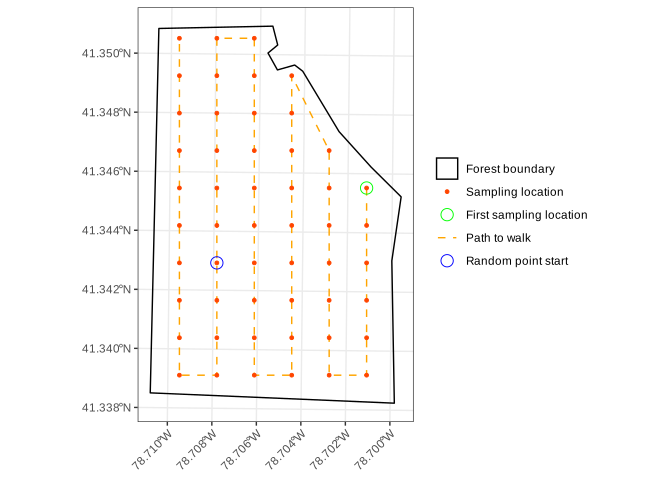
FIGURE 14.1: Systematic sampling design for an Elk County property cruise.
Let’s create a few variations on the design shown in Figure 14.1 by rotating the grid and choosing a different origin—while keeping the same random point start. This isolates the effect of orientation and ordering. To reduce code clutter, we don’t show the calls to plot_sys_grid() or the patchwork functions used to produce the composite graphic shown in Figure 14.2.
# (a) Rotate grid 45 degrees.
set.seed(1)
sys_a <- sys_grid(bounds,
                            D_l = 7 * 66, D_p = 7 * 66, angle = 45)

# (b) Northwest corner start.
set.seed(1)
sys_b <- sys_grid(bounds,
                            D_l = 7 * 66, D_p = 7 * 66, origin = "nw")

# (c) Rotation and northwest corner start.
set.seed(1)
sys_c <- sys_grid(bounds,
                            D_l = 7 * 66, D_p = 7 * 66,
                            angle = 45,  origin = "nw")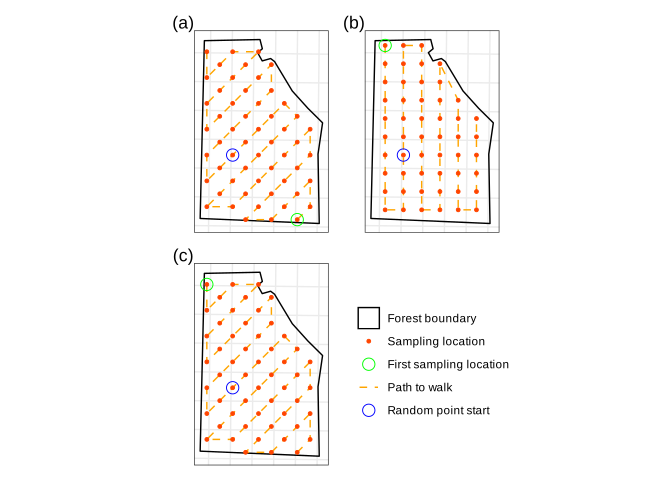
FIGURE 14.2: Systematic sampling design for an Elk County cruise under different grid rotations and starting origins.
Notice in Figures 14.1 and 14.2 that the only random component of systematic sampling is the random point start. Once that point is chosen, all other sampling locations are fixed by the grid’s spacing and rotation. Thus, the layout looks highly structured, but it still retains a probabilistic foundation because the sample depends on a randomly chosen start. This single source of randomness is what allows SYS to be used for statistical inference, subject to the assumptions and caveats outlined in the next section.
With the sampling grid in place, we now turn to estimation using data collected under systematic sampling.
14.5 Estimation using SYS
The SYS estimators for the population mean \(\mu\) (11.1) and total \(\tau\) (11.6) are the same unbiased sample mean \(\bar{y}\) (11.15) and total \(\hat{t}\) (11.22) used under SRS (Section 11.3). Both are unbiased under SYS.
Forest variables almost always show positive spatial dependence or broad-scale trends, where nearby locations tend to have more similar values than locations farther apart. In these settings, systematic sampling produces more stable mean estimates than SRS because the grid spreads observations evenly across the population. As a result, the sampling distribution of the SYS mean is typically narrower than that produced under SRS at the same sampling intensity. This behavior is well documented in operational inventory studies and helps explain why SYS is widely viewed as an efficient and practical design when populations exhibit spatial structure.
There is, however, no valid design-based estimator for the sample variance (and thus no estimator for the standard error of the mean) under SYS. The common workaround is to apply the SRS estimators for variance (11.17) and standard error (11.21).
The reason SYS lacks a valid variance estimator is fairly intuitive. Recall from Section 11.3 that the SRS sample variance estimator assumes the \(n\) observations are drawn independently and at random from the population. This independence justifies the use of \(n - 1\) in the denominator of (11.17), reflecting that one degree of freedom is consumed in estimating the sample mean.
By contrast, under SYS a single random start point determines the entire sample. Once the start is fixed, all subsequent locations are determined by the grid layout, so the observations are not independent. From this perspective, SYS behaves more like a sample of size one than a sample of size \(n\). Plugging \(n = 1\) into the SRS variance estimator (11.17) leads to division by zero, which highlights the core issue: SYS doesn’t yield a set of independent observations, and the usual SRS variance logic doesn’t apply.
Despite this limitation, the SRS variance estimator is widely used as a practical approximation under SYS. It’s considered safe because it tends to be conservative, producing wider than necessary confidence intervals. However, this conservatism can be wasteful, since it doesn’t reflect the improved precision of the SYS mean that results from spreading the sample evenly across the population.
A brief overview of alternative SYS-specific variance estimators and spatially balanced sampling designs is offered in Section 14.7, which may be helpful for inventories conducted over larger spatial extents, including NFI-style applications.
14.6 Advantages and disadvantages of systematic sampling
Systematic sampling offers several practical benefits and is widely used in forestry, but like all designs, it involves trade-offs. Here we summarize its main strengths and limitations, particularly in comparison to SRS.
14.6.1 Advantages
Efficient field layout: SYS designs are easy to implement in the field. Sampling locations fall on a predictable grid, allowing cruisers to follow straight lines, reducing travel time and simplifying navigation.
Improved spatial coverage: Grid-based sampling ensures sampling locations are evenly distributed across the population, helping to capture spatial heterogeneity and reduce the risk of missing important features—a common concern with SRS.
Simplifies remeasurement: Because sampling locations follow a fixed, repeatable pattern, they’re easier to relocate during future inventory cycles.
Cost-effective: The combination of reduced travel time and simplified logistics typically results in lower per-unit sampling cost compared to SRS.
Increased precision: When spatial dependence or broad-scale trends are present, SYS will yield more precise estimates of the mean and total than SRS for the same sample size.
14.6.2 Disadvantages
- No valid variance estimator: SYS lacks a design-based estimator for the sample variance and standard error. While the SRS estimator is commonly used as an approximation, it can overestimate uncertainty, depending on the population structure. A variety of alternative variance estimators exist (See Section 14.7), but none fully resolve the lack of a general design-based solution.
Despite these drawbacks, SYS remains a go-to design in operational forestry due to its simplicity, spatial coverage, and low implementation cost. When used thoughtfully—with attention to population structure and proper randomization of the starting point—SYS can yield highly effective inventory data.
14.7 SYS at larger scales: Variance and design alternatives
SYS is a practical and reliable choice for stand-scale and medium-scale forest inventories. Its field efficiency, repeatability, and spatial coverage make it hard to beat when navigating sampling locations during a cruise. At larger scales—such as regional monitoring programs and NFIs—the limitations of SYS become more consequential, especially when the objective is to realize statistical efficiency gains from designs implemented at substantial cost across broad spatial and temporal extents.
Two related issues motivate the development of alternatives. First, given an existing SYS design, how can variance be estimated in a way that better reflects the sampling distribution of the mean? Second, can alternative sampling designs be constructed that retain the space-covering qualities of SYS while providing stronger design-based support for inference over large areas?
The first issue is addressed through the development of SYS-specific variance estimators. On the second issue, spatially balanced probability sampling designs extend the core idea behind SYS by deliberately spreading sampling locations across the population so that nearby locations are unlikely to be selected together. By enforcing spatial spread at the design stage, these methods help samples capture broad spatial patterns more efficiently.
On the first point, applying the SRS variance estimator to SYS samples is known to produce standard errors that are too large when broad spatial trends are present. These inflated standard errors can obscure much of the efficiency that SYS provides in such settings. This behavior has been documented in several forestry applications; see, for example, Magnussen et al. (2020) and Räty et al. (2020). To address this, SYS-specific variance estimators have been proposed. Magnussen et al. (2020) provide an overview, historical perspective, and comparison of these methods. Variants of these estimators, including the local-difference estimators originally proposed by Matérn (1947), have been applied in the Swedish and Finnish NFIs (Ranneby et al. (1987); Heikkinen (2006)). While these estimators often outperform the SRS estimator and reveal more of the precision inherent in SYS, their performance still depends on how the systematic grid interacts with spatial patterns in the population.
Alongside these developments, a number of spatially balanced probability sampling designs have been proposed for large-area inventories. A leading example is the local pivotal method (LPM; Grafström et al. (2012); Grafström et al. (2017)), which enforces spatial spread directly in the sample selection process. When spatially explicit auxiliary variables correlated with the parameters of interest are available—for example, remote-sensing-based productivity layers—LPM can also spread the sample in auxiliary-variable space. LPM and related designs have been applied in recent NFI-scale studies (e.g., Grafström et al. (2017); Heikkinen et al. (2025)). Implementations of LPM are available in R via the BalancedSampling package (Grafström and Prentius 2024), with related spatially balanced designs available in spsurvey (Dumelle et al. 2023). See also Brus (2022) for instructional treatments of these methods and their implementation in R.
For most stand- and property-scale inventories, SYS coupled with the SRS variance estimator remains a practical—though potentially overly conservative—choice. At regional or national scales, where accurate variance estimation in the presence of broad spatial structure is essential, SYS paired with specialized variance estimators or spatially balanced designs such as LPM provides useful alternatives.
This brief section highlights options that become more relevant as inventory scale increases. Keep these alternative variance estimators and spatially balanced designs in mind when SYS is applied in later chapters.
14.8 Exercises
14.8.1 Elk County timber cruise
The Elk County, Pennsylvania cruise and resulting data, introduced in Sections 1.2.2 and 8.5, were collected on a 271-acre forested property. The cruise included 54 sampling points where the forester recorded tree species, DBH, height, and sawlog potential. Sampling points were laid out on a 7-by-7 chain grid (1 chain = 66 ft), giving roughly one point per 5 acres, using a systematic sampling design. At each point, tally trees were selected with an English 10 BAF prism.
FIGURE 14.3: Systematic sample layout for the Elk County timber cruise in northwestern Pennsylvania. Points are colored by the number of 16-ft hardwood sawlogs per acre. The dotted orange line shows the path followed by the forester between points. An English 10 BAF prism was used to select tally trees at each point.
Figure 14.3 shows the sampling layout, with points colored by the number of 16-ft hardwood sawlogs per acre. The dotted orange line indicates the transect, or path, followed by the forester between points.
Over the next several exercises, you’ll use the Elk County cruise data to generate property-level estimates for hardwood trees classified as acceptable growing stock (AGS) sawtimber. Specifically, you’ll estimate mean basal area per acre (ft\(^2\)), mean trees per acre (density), and mean number of 16-ft sawlogs per acre, and report 95 percent confidence intervals for each estimate.
All estimates will be based on the tree measurements collected at the \(n\) = 54 sampling points described above. These data are provided in "Elk_hardwood_sawtimber_trees_BAF10.csv" found in "datasets/PA".
Use the following steps to complete your task.
Read in the tree measurement data and examine how they’re organized. Each row represents a measurement tree (“in” tree) tallied using point sampling, except at points with no trees. The
tree_countcolumn shows how many trees the row represents—here, values are either 1 or 0. Points with no trees appear as a single row with zeros for numeric variables and"No trees"in thespeciescolumn. For this cruise,tree_countnever exceeds 1; however, we still recommend carryingtree_countthrough your workflow (see Section 12.6.2) so your code stays reusable for other datasets where a row may represent more than one tree.Generate point-level summaries for basal area per acre, trees per acre, and logs per acre. Following Section 12.4, recall that under horizontal point sampling:
- Basal area per acre at a point equals the number of measurement trees at that point multiplied by the BAF;
- Trees per acre at a point equals the sum of the tree factors (TF) for all measurement trees at that point, where each tree’s TF is defined in (12.22);
- Logs per acre at a point equals the sum of each measurement tree’s number of logs multiplied by that tree’s TF.
Using the \(n\) point-level summaries from Step 2, estimate the property’s mean per-acre basal area, density, and number of logs, and report 95 percent confidence intervals for each. Compute sample means and standard errors using the SRS estimators in (11.15) and (11.21), then form confidence intervals using (11.31). Finally, scale the per-acre means by the total property area to obtain total estimates, and report the corresponding 95 percent confidence intervals for totals.
To get you started, we read in the data below. Use these data for all subsequent exercises in this section. Your job is to write the tidyverse code needed to reproduce the output we provide.
#> Rows: 251
#> Columns: 5
#> $ point_id   <dbl> 1, 1, 1, 1, 1, 1, 1, 1, 1, 2, 2, 2…
#> $ tree_count <dbl> 1, 1, 1, 1, 1, 1, 1, 1, 1, 1, 1, 1…
#> $ species    <chr> "Black Cherry", "Black Cherry", "S…
#> $ DBH_in     <dbl> 12, 16, 16, 18, 16, 16, 16, 14, 30…
#> $ logs_16ft  <dbl> 1.0, 1.0, 2.0, 2.0, 1.5, 2.0, 2.0,…
Exercise 14.1 How many unique sampling points were measured on the property? Confirm your answer using Figure 14.3.
#> # A tibble: 1 × 1
#>   n_points
#>      <int>
#> 1       54
Exercise 14.2 How many points have no measurement trees?
Hint, tree_count is zero when no trees were tallied at that point.
#> # A tibble: 1 × 1
#>   n_points_w_zero_trees
#>                   <int>
#> 1                     9
Exercise 14.3 Excluding points with no trees, what are the minimum and maximum numbers of tallied trees across points?
Hint, use filter(), group_by(), and two calls to summarize().
#> # A tibble: 1 × 2
#>   m_trees_min m_trees_max
#>         <dbl>       <dbl>
#> 1           1          12
Exercise 14.4 Now start the workflow for property-level estimates.
Add a tree factor column so that each tree has its own tree factor. Recall from Section 12.4 that, for point sampling, the tree factor is a function of the BAF and the tree’s DBH. Following the methods in Section 12.4 and the computing steps in Section 12.6.2, add the TF column to elk_trees. When adding TF, use if_else() inside mutate() so that TF is zero when tree_count is zero.
For readability, we placed TF immediately after tree_count. Part of the resulting tibble is shown below.
#> # A tibble: 251 × 6
#>    point_id tree_count    TF species   DBH_in logs_16ft
#>       <dbl>      <dbl> <dbl> <chr>      <dbl>     <dbl>
#>  1        1          1 12.7  Black Ch…     12       1
#>  2        1          1  7.16 Black Ch…     16       1
#>  3        1          1  7.16 Sugar Ma…     16       2
#>  4        1          1  5.66 Sugar Ma…     18       2
#>  5        1          1  7.16 Sugar Ma…     16       1.5
#>  6        1          1  7.16 Black Ch…     16       2
#>  7        1          1  7.16 Black Ch…     16       2
#>  8        1          1  9.35 Black Ch…     14       1.5
#>  9        1          1  2.04 Sugar Ma…     30       2
#> 10        2          1  7.16 Red Maple     16       1.5
#> # ℹ 241 more rows
Exercise 14.5 Compute the per-acre point-level summaries for basal area, density, and logs. Assign your result to point_summary.
We append _i to each variable to indicate that it corresponds to the \(i\)-th point and to match the notation used in Chapter 12. Our result is printed below.
#> # A tibble: 54 × 4
#>    point_id  ba_i trees_i logs_i
#>       <dbl> <dbl>   <dbl>  <dbl>
#>  1        1    90    65.6  103.
#>  2        2    50    26.6   52.4
#>  3        3    70    56.4   90.3
#>  4        4    80    58.3   91.7
#>  5        5    80    56.4   98.2
#>  6        6    40    25.7   36.1
#>  7        7    50    32.4   51.5
#>  8        8    80    56.4   73.2
#>  9        9    30    16.3   29.1
#> 10       10    40    31.5   47.2
#> # ℹ 44 more rows
Exercise 14.6 Using your point_summary from Exercise 14.5, compute property-level estimates for the per-acre sample mean (\(\bar{y}\)) and standard error of the mean (\(s_{\bar{y}}\)), along with 95% confidence intervals for basal area, density, and logs per acre.
Means are calculated using (11.15), standard errors using (11.21), and confidence intervals using (11.31).
Assign your result to property_summary. Our result is printed below and includes the intermediate values of sample size \(n\) and \(\tval\)-value for reference.
#> Rows: 1
#> Columns: 14
#> $ n              <int> 54
#> $ t              <dbl> 2.0057
#> $ ba_bar         <dbl> 44.815
#> $ s_ba_bar       <dbl> 4.1776
#> $ ba_ci_lower    <dbl> 36.436
#> $ ba_ci_upper    <dbl> 53.194
#> $ trees_bar      <dbl> 34.199
#> $ s_trees_bar    <dbl> 3.2352
#> $ trees_ci_lower <dbl> 27.71
#> $ trees_ci_upper <dbl> 40.688
#> $ logs_bar       <dbl> 51.372
#> $ s_logs_bar     <dbl> 4.9521
#> $ logs_ci_lower  <dbl> 41.44
#> $ logs_ci_upper  <dbl> 61.305
Exercise 14.7 Using your property_summary from Exercise 14.6, compute property-level totals for basal area, density, and logs. You can obtain these by scaling the per-acre estimates and their confidence limits by the property area of 271 acres. Assign your result to property_summary_totals. Our result is printed below.
Hint, there’s no need to recalculate anything—use a single mutate() or transmute() on property_summary to multiply each mean and confidence interval bound by the property area. We used transmute() to retain only the desired total estimates in property_summary_totals.
#> Rows: 1
#> Columns: 10
#> $ A_ac              <dbl> 271
#> $ ba_total          <dbl> 12145
#> $ ba_total_lower    <dbl> 9874.1
#> $ ba_total_upper    <dbl> 14416
#> $ trees_total       <dbl> 9268
#> $ trees_total_lower <dbl> 7509.5
#> $ trees_total_upper <dbl> 11027
#> $ logs_total        <dbl> 13922
#> $ logs_total_lower  <dbl> 11230
#> $ logs_total_upper  <dbl> 16614
14.8.1.1 Cruise stand and stock tables
Next, you’ll apply what you learned about stand and stock tables in Sections 8.3 and 12.6.3 to the Elk County cruise data.
Your stand table will summarize trees per acre by species and DBH class, and your stock table will summarize logs per acre by species and DBH class. Both tables will use the same elk_trees dataset you worked with in the previous exercises to generate property-level estimates.
Let’s begin with a fresh copy of elk_trees, ensure that point IDs are stored as factors, and remove rows where tree_count == 0.
elk_trees <-
  read_csv("datasets/PA/Elk_hardwood_sawtimber_trees_BAF10.csv")

elk_trees <- elk_trees %>%
  mutate(point_id = factor(point_id)) %>%
  filter(tree_count != 0)

elk_trees %>% glimpse()
#> Rows: 242
#> Columns: 5
#> $ point_id <fct> 1, 1, 1, 1, 1, 1, 1, 1, 1, 2, 2, 2…
#> $ tree_count <dbl> 1, 1, 1, 1, 1, 1, 1, 1, 1, 1, 1, 1…
#> $ species <chr> "Black Cherry", "Black Cherry", "S…
#> $ DBH_in <dbl> 12, 16, 16, 18, 16, 16, 16, 14, 30…
#> $ logs_16ft <dbl> 1.0, 1.0, 2.0, 2.0, 1.5, 2.0, 2.0,…Exercise 14.8 Add a column of 4-inch DBH classes to elk_trees for summarizing trees and logs per acre.
Your result should match ours printed below.
#> # A tibble: 242 × 6
#>    point_id tree_count species      DBH_in logs_16ft DBH_4in
#>    <fct>         <dbl> <chr>         <dbl>     <dbl> <fct>
#>  1 1                 1 Black Cherry     12       1   [10,14]
#>  2 1                 1 Black Cherry     16       1   (14,18]
#>  3 1                 1 Sugar Maple      16       2   (14,18]
#>  4 1                 1 Sugar Maple      18       2   (14,18]
#>  5 1                 1 Sugar Maple      16       1.5 (14,18]
#>  6 1                 1 Black Cherry     16       2   (14,18]
#>  7 1                 1 Black Cherry     16       2   (14,18]
#>  8 1                 1 Black Cherry     14       1.5 [10,14]
#>  9 1                 1 Sugar Maple      30       2   (26,30]
#> 10 2                 1 Red Maple        16       1.5 (14,18]
#> # ℹ 232 more rows
Exercise 14.9 Use complete() to add unobserved species and DBH class combinations for each point, filling missing tree_count and logs_16ft values with zeros. Assign your output to elk_trees_complete.
We printed our result below. Make sure yours matches ours. Check the number of rows—if your count is smaller, confirm that your complete() call includes point_id, species, and DBH_4in.
As discussed in Section 12.6.3, including these zeros ensures that every species and DBH class combination contributes correctly to the property-level estimates.
#> # A tibble: 1,989 × 6
#>    point_id species      DBH_4in tree_count DBH_in logs_16ft
#>    <fct>    <chr>        <fct>        <dbl>  <dbl>     <dbl>
#>  1 1        Beech        [10,14]          0     NA       0
#>  2 1        Beech        (14,18]          0     NA       0
#>  3 1        Beech        (18,22]          0     NA       0
#>  4 1        Beech        (22,26]          0     NA       0
#>  5 1        Beech        (26,30]          0     NA       0
#>  6 1        Black Cherry [10,14]          1     12       1
#>  7 1        Black Cherry [10,14]          1     14       1.5
#>  8 1        Black Cherry (14,18]          1     16       1
#>  9 1        Black Cherry (14,18]          1     16       2
#> 10 1        Black Cherry (14,18]          1     16       2
#> # ℹ 1,979 more rows
Exercise 14.10 Add a tree factor (TF) column to elk_trees_complete. Use the same if_else() approach as in Exercise 14.4, setting TF = 0 when tree_count == 0. Your result should match ours printed below.
#> Rows: 1,989
#> Columns: 7
#> $ point_id   <fct> 1, 1, 1, 1, 1, 1, 1, 1, 1, 1, 1, 1…
#> $ species    <chr> "Beech", "Beech", "Beech", "Beech"…
#> $ DBH_4in    <fct> "[10,14]", "(14,18]", "(18,22]", "…
#> $ tree_count <dbl> 0, 0, 0, 0, 0, 1, 1, 1, 1, 1, 0, 0…
#> $ DBH_in     <dbl> NA, NA, NA, NA, NA, 12, 14, 16, 16…
#> $ logs_16ft  <dbl> 0.0, 0.0, 0.0, 0.0, 0.0, 1.0, 1.5,…
#> $ TF         <dbl> 0.0000, 0.0000, 0.0000, 0.0000, 0.…
Exercise 14.11 Compute point-level summaries for trees per acre and logs per acre by species, DBH class, and point.
As shown in Section 12.6.3, group by species, DBH_4in, and point_id, then summarize totals. Assign your result to point_summary.
Your output should match ours printed below. There is a useful check here. Note that there are 7 species, 5 DBH classes, and 54 points. The product of these numbers (i.e., 1890) is the expected number of rows in point_summary below.
#> # A tibble: 1,890 × 5
#>    species DBH_4in point_id trees_i logs_i
#>    <chr>   <fct>   <fct>      <dbl>  <dbl>
#>  1 Beech   [10,14] 1           0       0
#>  2 Beech   [10,14] 2           0       0
#>  3 Beech   [10,14] 3          12.7    12.7
#>  4 Beech   [10,14] 4           9.35   14.0
#>  5 Beech   [10,14] 5           0       0
#>  6 Beech   [10,14] 6           0       0
#>  7 Beech   [10,14] 7           0       0
#>  8 Beech   [10,14] 8           0       0
#>  9 Beech   [10,14] 9           0       0
#> 10 Beech   [10,14] 10          0       0
#> # ℹ 1,880 more rows
Exercise 14.12 Using your point_summary, compute property-level means for trees per acre and logs per acre by species and DBH class. These means (\(\hat{y}\)) represent the per-acre estimates for each species and DBH combination.
You’ll group by species and DBH_4in, and take the mean of trees_i and logs_i.
Assign your result to property_summary. Your output should match ours printed below.
#> # A tibble: 35 × 4
#>    species      DBH_4in trees_hat logs_hat
#>    <chr>        <fct>       <dbl>    <dbl>
#>  1 Beech        [10,14]    1.70      1.79
#>  2 Beech        (14,18]    0.398     0.663
#>  3 Beech        (18,22]    0.0849    0.127
#>  4 Beech        (22,26]    0         0
#>  5 Beech        (26,30]    0         0
#>  6 Black Cherry [10,14]    1.75      2.09
#>  7 Black Cherry (14,18]    1.79      3.59
#>  8 Black Cherry (18,22]    0.480     1.10
#>  9 Black Cherry (22,26]    0         0
#> 10 Black Cherry (26,30]    0         0
#> # ℹ 25 more rows
Exercise 14.13 Finally, use pivot_wider() on your property_summary to create the stand and stock tables.
Your stand table should match ours printed below and display trees per acre by species and DBH class.
#> # A tibble: 7 × 6
#>   species       `[10,14]` `(14,18]` `(18,22]` `(22,26]` `(26,30]`
#>   <chr>             <dbl>     <dbl>     <dbl>     <dbl>     <dbl>
#> 1 Beech             1.70      0.398    0.0849    0         0
#> 2 Black Cherry      1.75      1.79     0.480     0         0
#> 3 Cucumber Tree     0.173     0.342    0.155     0.0589    0
#> 4 Red Maple        13.7       7.13     2.68      0.118     0.0433
#> 5 Sugar Maple       1.51      0.712    0         0         0.0377
#> 6 Yellow Birch      1.04      0.237    0         0         0
#> 7 Yellow Poplar     0         0        0         0.0502    0
Then, repeat the process to create the stock table showing logs per acre by species and DBH class. Your result should match ours printed below.
#> # A tibble: 7 × 6
#>   species       `[10,14]` `(14,18]` `(18,22]` `(22,26]` `(26,30]`
#>   <chr>             <dbl>     <dbl>     <dbl>     <dbl>     <dbl>
#> 1 Beech             1.79      0.663     0.127     0        0
#> 2 Black Cherry      2.09      3.59      1.10      0        0
#> 3 Cucumber Tree     0.260     0.960     0.465     0.177    0
#> 4 Red Maple        16.5      13.1       5.43      0.236    0.108
#> 5 Sugar Maple       1.68      1.29      0         0        0.0755
#> 6 Yellow Birch      1.13      0.409     0         0        0
#> 7 Yellow Poplar     0         0         0         0.151    0
Typically, we’d finish off these stand and stock tables by adding row and column totals, the code for which is provided near the end of Section 8.3.
References
Any of these objects can be saved to a file using
st_write()from thesfpackage to be read by GIS or GPS software.↩︎The specific projection is NAD83 / Pennsylvania South (ft), which corresponds to EPSG:2271.↩︎
In
plot_sys_grid(), notice how thegeom_sf()layers automatically render eachsfobject based on its geometry type—points, lines, or polygons—making it easy to build clean and consistent maps. You can modify the function to adjust colors, symbols, or other plot features to suit your needs.↩︎